How To Fix 5G Advanced Network Handoff Interruptions?
Have you ever been on a video call and your screen freezes as you walk into another room? That sudden lag often happens during a network handoff. Your phone switches from one cell tower to another, and sometimes that switch does not go smoothly.
5G Advanced networks are built to make these switches faster and smoother. A new feature called L1/L2 Triggered Mobility (LTM) helps reduce interruption time during handoffs. It is part of the 3GPP Release 16 standard, and it changes how your phone talks to nearby towers.
But even with this smart technology, interruptions still happen. Weak signals, physical obstructions, and outdated settings can all get in the way.
This guide breaks down why these interruptions occur and how LTM works behind the scenes. You will also learn simple, practical fixes you can try right now.
In a Nutshell
- Restart your equipment first. This simple step refreshes your connection and clears small network glitches.
- Try toggling Airplane Mode on and off. This forces your phone to search for a fresh, stronger signal.
- Check for physical obstructions. Thick walls or metal objects can block signals between cell towers.
- Remove your phone case if you notice weak signal strength. Some cases contain materials that interfere with reception.
- Understand that LTM technology works in the background. It uses Layer 1 and Layer 2 triggers to make cell switches quicker.
- Remember this process follows the 3GPP Release 16 standard. This ensures your device talks to towers using the same smart rules.
- Watch out for environmental interference. Things like microwaves or other electronics can disrupt your connection nearby.
What Are 5G Advanced Network Handoff Interruptions
A 5G Advanced network handoff interruption happens when your phone switches between different cell towers or network bands. You might notice your call drops for a second, your video freezes, or your download speed suddenly slows down. This brief pause occurs during the transition moment.
Your device needs to establish a connection with a new cell tower while maintaining your active session. The old connection must hand off to the new one. If this process takes too long, you experience a service interruption.
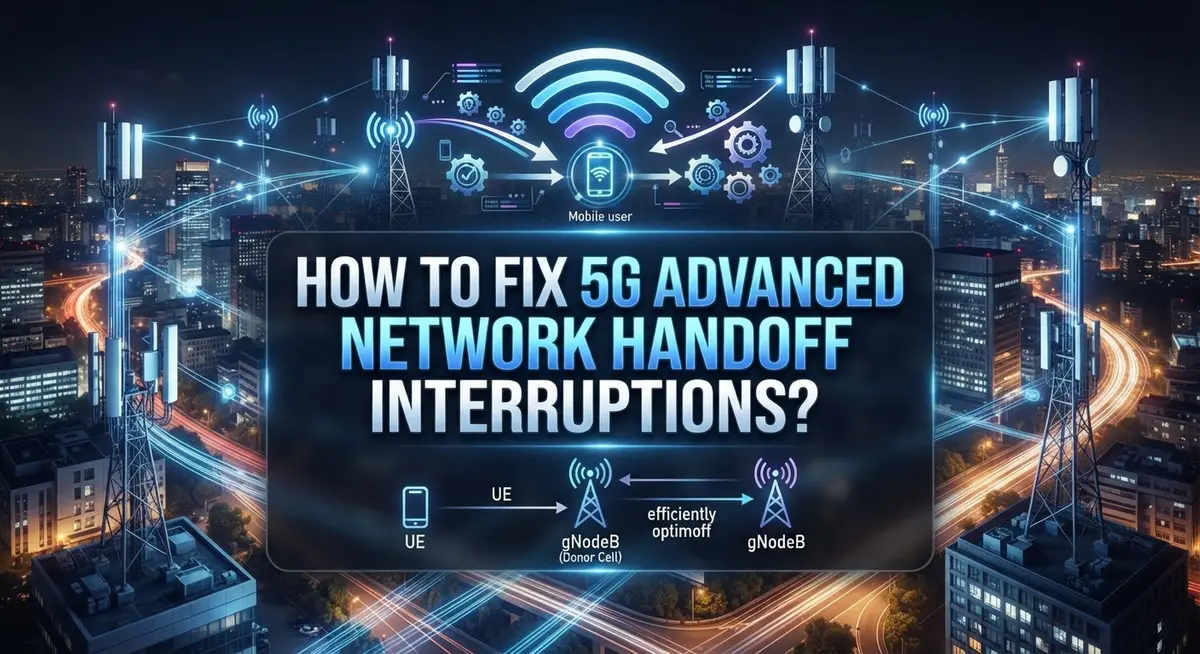
LTM (L1/L2 Triggered Mobility) is the technology that reduces these interruption times. It works at the lowest network layers to speed up the handoff process. The system prepares the target cell connection before fully switching over.
The handoff process involves three main phases. First, the network prepares the target cell for your device. Second, your device and the network synchronize the uplink and downlink signals. Third, the network triggers the actual switch to the target cell.
Environmental factors cause many interruptions. Physical obstructions like walls, metal structures, or even your phone case can weaken signals during handoffs. Interference from other devices also plays a role. Your device might struggle to find the optimal switching moment.
5G Advanced networks use the 3GPP Release 16 standard to manage these handoffs. This standard applies especially to Non-Standalone (NSA) mode, where 5G works alongside 4G networks. Understanding this background helps you recognize why handoffs happen and why they sometimes fail.
The key point is simple: handoff interruptions are brief moments when your phone switches network connections. Modern 5G technology makes these switches faster, but physical and environmental factors still cause problems.
Understanding L1/L2 Triggered Mobility (LTM) and 3GPP Release 16
L1/L2 Triggered Mobility, or LTM, is a specific technology that reduces the time your phone loses connection during network handoffs. It works at the lowest layers of your network stack, which means it operates before higher level systems even notice a switch is happening.
The technology was introduced in the 3GPP Release 16 standard. This standard set the rules for how 5G Advanced networks should handle mobility events. LTM specifically addresses Non Standalone mode, which is how most 5G devices currently operate.
Here is how LTM actually works. Your device prepares for a handoff before it fully switches cells. During the preparation phase, your phone starts gathering signal measurements from nearby towers. This happens continuously in the background without interrupting your call or data session.
Next comes the pre synchronization step. Your device aligns with the target cell’s timing and frequency before making the actual switch. This preparation means less time is wasted when the network finally triggers the handoff.
The execution phase is where LTM shows its real value. The network sends a command at Layer 1 or Layer 2 to switch your connection to the target cell. Because your phone already prepared and synchronized, this switch happens almost instantly.
The result is dramatically reduced interruption time. Instead of several hundred milliseconds of lost connection, you might experience only tens of milliseconds. For video calls or online gaming, this difference is the difference between a smooth experience and a noticeable freeze.
Understanding LTM helps you grasp why modern 5G handoffs are smoother than older network technologies. The standard ensures consistent behavior across different devices and networks.
Why Handoff Interruptions Happen in 5G HetNets
Handoff interruptions in 5G HetNets happen because your phone must switch between different cell towers or network bands while keeping your connection active. This switching process isn’t instant, and brief data loss occurs during the transition.
Several factors trigger these interruptions. Your device searches for the best available signal from nearby cells. When it finds a stronger signal, it initiates a handoff to maintain connection quality. The network must coordinate this switch across multiple layers of technology, which takes time.
Environmental interference plays a major role. Walls, buildings, and metal objects block or weaken 5G signals. Physical obstructions force your phone to search more frequently for stable connections, increasing handoff events. Weather conditions also affect signal strength and trigger more handoffs than usual.
Network congestion creates additional problems. When many devices connect to the same cell tower, the network becomes overloaded. Your phone must switch to less congested cells more often, causing more interruptions.
Device interference matters too. Phone cases, protective covers, and even your hand placement can block antennas. This weak signal forces constant handoff attempts as your phone struggles to maintain connection.
The 3GPP Release 16 standard introduced L1/L2 Triggered Mobility (LTM) to address these issues. LTM reduces interruption time by preparing the target cell before your phone actually switches. The network pre synchronizes your device with the new cell during the preparation phase.
Without LTM technology, handoffs took longer and caused noticeable service drops. Modern 5G Advanced networks handle these switches much faster. Understanding why interruptions happen helps you identify whether the problem stems from your device, environment, or network conditions.
Step-by-Step: Diagnosing a Handoff Interruption Issue
Start by checking your signal strength. Open your phone’s settings and look for signal bars or signal strength indicators. Weak signals often trigger unnecessary handoffs. If bars are low, move to a different location and test again.
Next, identify physical obstructions around you. Walls, metal objects, and dense materials block 5G signals. Remove your phone case temporarily to see if signal improves. Many cases contain materials that weaken reception. If signal jumps up, consider a thinner case or one made from signal friendly materials.
Check for device interference sources. Microwaves, wireless routers, and Bluetooth devices operate on similar frequencies as 5G networks. Turn off nearby devices one at a time and monitor whether interruptions decrease. This helps pinpoint the actual interference culprit.
Restart your device to refresh the connection. Power off your phone completely, wait 30 seconds, then power it back on. This clears temporary connection states and forces your device to reconnect properly.
Toggle Airplane Mode on and off. Activate Airplane Mode for 10 seconds, then deactivate it. This forces your phone to rescan available networks and establish a fresh connection without restarting entirely.
Monitor your network band. Some 5G bands experience more handoff issues than others depending on your location. Check which 5G band your phone currently uses through your device settings.
Document when interruptions occur. Note the time, location, and what you were doing. Patterns emerge quickly. If interruptions happen in the same spot, environmental factors are likely responsible. If they happen randomly throughout your day, device settings may need adjustment.
These steps create a clear picture of what causes your specific handoff problems.
Step-by-Step: Fixing Handoff Interruptions on Your Device
Now that you understand what causes handoff interruptions, let’s fix them. These practical steps work on most modern devices and networks.
Start with the simplest solution first. Toggle Airplane Mode on for 10 seconds, then turn it off. This forces your device to reconnect to the network fresh. Your phone will search for the strongest available signal and reestablish connection properly.
Next, restart your device completely. Power it down fully, wait 30 seconds, then turn it back on. This clears temporary connection issues and refreshes how your device communicates with nearby cells. Many handoff problems disappear after a simple restart.
Check your physical environment next. Remove your phone case if you have one, especially if it’s thick or metal lined. Cases can block or weaken 5G signals significantly. Walk around your location to find spots with stronger signal bars. Avoid staying near walls, metal objects, or other barriers that interfere with signal transmission.
Look for device interference sources around you. Microwaves, wireless speakers, and cordless phones can disrupt 5G connections. Move away from these devices or turn them off temporarily to test if they cause interruptions.
If problems continue, check your device settings. Make sure your phone supports 5G bands available in your area. Some older devices don’t support newer 5G frequencies that carriers recently activated.
Document when interruptions happen. Note the time, location, and what apps you were using. This information helps identify patterns. If interruptions occur only in specific places, the problem is likely environmental rather than a device issue.
Try these steps in order. Most handoff interruptions resolve after completing these basic fixes.
Tips for Preventing Future Handoff Drops
Preventing future handoff drops requires understanding what causes them in the first place. Your device switches between cells constantly as you move. Each switch creates a brief moment where data interrupts. By taking simple steps now, you avoid these problems later.
Keep your device software updated. Manufacturers release updates that improve how your phone handles 5G handoffs. These updates fix bugs that cause connection drops. Check your settings regularly for available updates and install them promptly.
Maintain a clean physical environment around your device. Remove unnecessary items that block your signal. Metal objects, thick cases, and electronic devices near your phone interfere with reception. Store your phone away from other electronics when possible. Keep it in your pocket or bag rather than on metal surfaces.
Avoid crowded network areas during peak times. Network congestion causes handoff problems. If you experience drops during specific hours, try using your device at different times. This helps you identify when your local network gets overloaded.
Monitor your signal strength regularly. Check your signal bars throughout the day. If you notice weak signals in certain locations, avoid those areas or use WiFi instead. Understanding your signal patterns helps you stay connected.
Restart your device weekly. This simple action refreshes your connection to the network. It clears temporary glitches that build up over time. A quick restart takes just a few minutes and prevents many future issues.
Position yourself strategically indoors. Move closer to windows or higher floors when you’re inside buildings. Walls block 5G signals more than older network types. Better positioning reduces handoff interruptions significantly.
These preventive steps reduce future problems substantially. Consistent habits keep your 5G connection smooth and reliable.
Common Mistakes When Troubleshooting Handoff Issues
People often make mistakes when troubleshooting handoff issues. These errors prevent you from finding the real problem and waste your time.
Ignoring environmental interference is a major mistake. Many people focus only on their device settings while missing obvious signal blockers. Walls, metal objects, and thick phone cases reduce signal strength significantly. Your environment matters just as much as your equipment.
Not restarting equipment quickly enough is another common error. People try multiple settings changes before attempting a simple restart. A restart refreshes your connection to the network and often solves handoff problems immediately. This should be your first step, not your last.
Overlooking physical obstructions around your device causes ongoing frustration. Thick phone cases, especially metal lined ones, block 5G signals. People remove their cases only after trying dozens of other solutions. Check your case first before exploring technical fixes.
Failing to document when interruptions happen prevents you from seeing patterns. You need to note the time, location, and what you were doing when drops occurred. This information reveals whether the problem happens in specific places or during certain activities. Without this data, you cannot identify the real cause.
Another mistake is checking only one potential cause at a time without being systematic. Toggle Airplane Mode, restart your device, remove obstructions, and check for interference in a logical order. Jumping randomly between solutions creates confusion.
People also ignore software updates that improve handoff performance. Manufacturers release updates specifically to enhance how your device handles 5G transitions. Skipping these updates means missing important fixes.
Finally, testing in poor signal areas leads to wrong conclusions. Move to a location with stronger signal before troubleshooting. This helps you determine whether the problem is environmental or device related.
Advanced Troubleshooting for Persistent Interruptions
When basic troubleshooting doesn’t solve your 5G handoff interruptions, you need to dig deeper. Advanced troubleshooting requires a systematic approach to identify what’s really happening beneath the surface.
Start by understanding your device’s handoff technology. Modern 5G devices use L1/L2 Triggered Mobility (LTM) to reduce interruption time during network switches. This technology, standardized in 3GPP Release 16, prepares your device for handoffs before they occur. If handoffs still fail, your device may not be properly executing this process.
Check your device’s dual connectivity settings. Your phone may support both standalone and non-standalone 5G modes. Switch between these modes to see which one works better in your location. Sometimes one mode handles handoffs more smoothly than the other.
Test your signal in multiple locations at different times. Move between areas with varying signal strength to understand where interruptions happen most. Document these patterns carefully. Interruptions that only occur in specific zones point to environmental issues rather than device problems.
Examine your network settings more closely. Access your device’s advanced options to verify which 5G bands your phone is using. Some bands handle mobility better than others. If your device keeps switching to a problematic band, you may need to manually adjust band preferences if your device allows this.
Monitor your device’s temperature during handoff issues. Overheating can disrupt the handoff process. Ensure your device has proper ventilation and isn’t running too many background apps.
Finally, check whether your service provider is experiencing network maintenance in your area. Contact them directly to confirm. Sometimes interruptions stem from network infrastructure updates rather than your device itself.
Final Thoughts
5G Advanced handoff interruptions can feel frustrating, but most fixes are simple. Understanding the basics helps you solve problems faster.
Technology like LTM (Layer 1/2 Triggered Mobility) works behind the scenes to make handoffs smoother. This standard, part of 3GPP Release 16, reduces the gap you feel when your phone switches cells.
You do not need to understand every technical detail. Instead, focus on what you can control. Your device settings, your environment, and your habits all play a role.
Simple actions often solve complex problems. Toggling airplane mode, restarting your equipment, and checking for obstructions fix many issues. These steps work because they refresh your connection to the network.
Physical barriers matter more than people think. A thick wall or a metal case can weaken your signal enough to cause drops. Small changes in your environment often bring big improvements.
Patience helps too. Networks are complex systems with many moving parts. Sometimes the fix takes a few tries before you notice a difference.
If problems continue, remember that dual connectivity and network congestion affect performance too. These factors are often outside your control, but they explain why interruptions happen even when your device works fine.
The good news is that 5G Advanced technology keeps improving. Features like LTM show how networks are designed to make transitions faster and smoother over time.
Your best strategy combines good habits with realistic expectations. Keep your device updated, stay aware of your surroundings, and try basic fixes first.
With these tools, you can handle most handoff interruptions with confidence. Small steps lead to fewer dropped connections and a better overall experience.
Frequently Asked Questions
What causes 5G handoff interruptions?
Handoff interruptions happen when your device switches between cells during a call or data session. Your phone loses connection briefly during this switch. Several factors cause this: environmental interference from buildings and obstacles, physical obstructions like walls or thick phone cases, network congestion, and device temperature issues.
The handoff process itself takes time. Your device must prepare, synchronize, and then execute the switch to a new cell. During this window, data can drop.
How does LTM reduce interruption time?
LTM stands for Layer 1/2 Triggered Mobility. This technology works at the physical and link layers of your connection. It speeds up the handoff process by preparing your device earlier in the switch sequence.
Instead of waiting for higher layer signals, LTM triggers the cell switch faster. This means less time without data flowing. The technology is part of 3GPP Release 16, which is the current standard for 5G Advanced networks.
Why does toggling Airplane Mode help?
Airplane Mode forces your device to drop all connections. When you turn it back on, your phone reconnects fresh to the network. This restart clears temporary connection issues and forces your device to find the best available cell.
This simple action often solves handoff problems because it eliminates cached connection data that might be causing trouble.
Can physical obstructions really affect handoffs?
Yes. Walls, metal objects, and even thick phone cases block 5G signals. When signal strength drops, your device struggles during handoffs. Removing barriers between you and the cell tower helps significantly.
Try removing your phone case temporarily to test if signal improves. Position yourself near windows when possible. Physical placement matters more than most people realize.

Hi, I’m Hana! I’m a tech lover who geeks out over software, gadgets, and all things digital. I started UniConverterBox to help everyday people navigate the overwhelming world of tech with honest reviews, clear comparisons, and simple guides. Got questions? I’m always happy to help!